
How Florida Scholarship Families Spend Funds: EMA, MyScholarShop & AAA SMP
Awarded a Florida Education Savings Account (ESA) scholarship — such as the Personalized Education Program (PEP) or the Family Empowerment Scholarship for Unique Abilities (FES-UA) — and wondering how you actually spend it? Funds sit in a digital account at your Scholarship Funding Organization (SFO). This guide names the official spend rails and where to confirm live purchase rules.
Confirm current eligibility, provider status, and purchase rules in EMA, Find Providers, MyScholarShop, or AAA SMP. This hub does not approve, verify, or predict payment.
Video explainer
At a glance
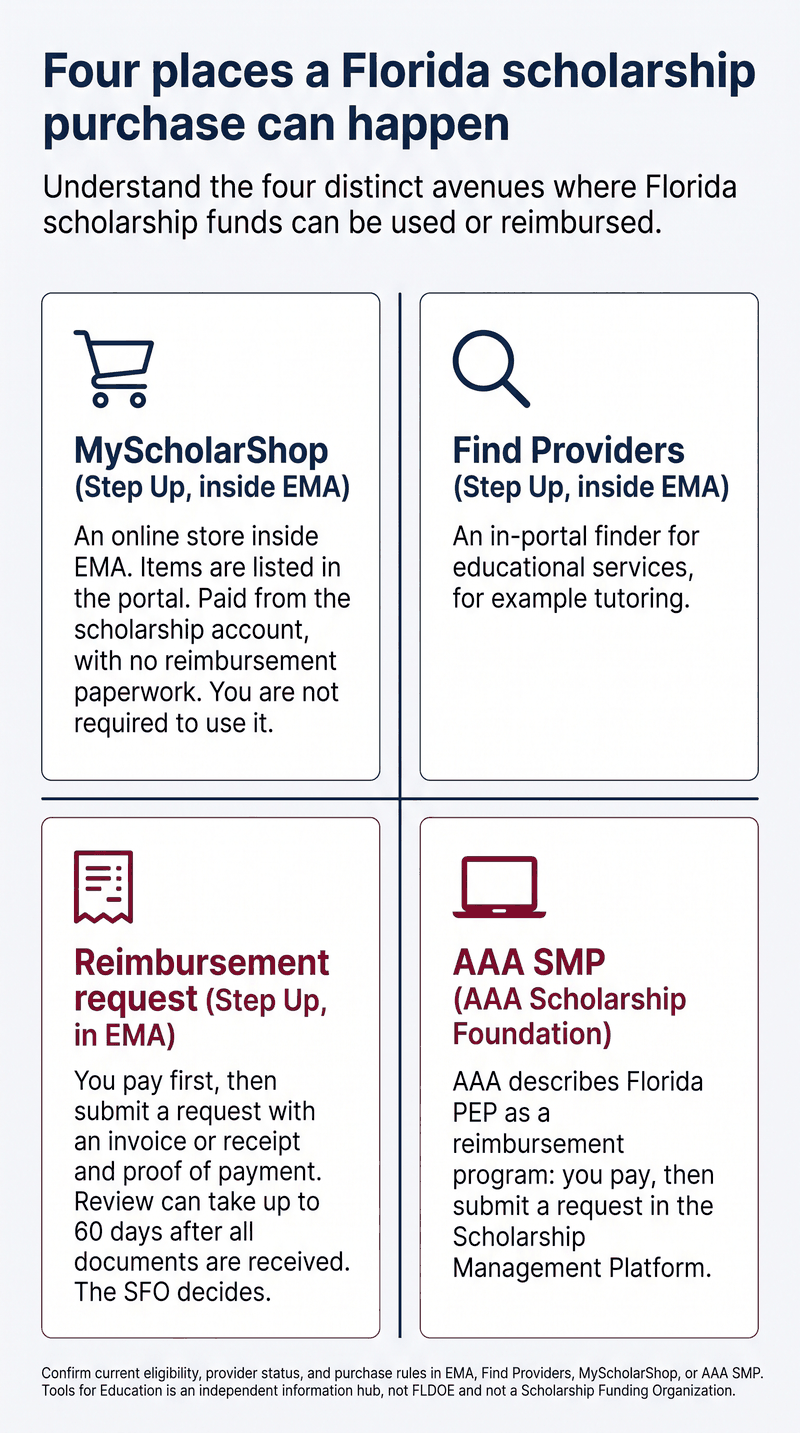
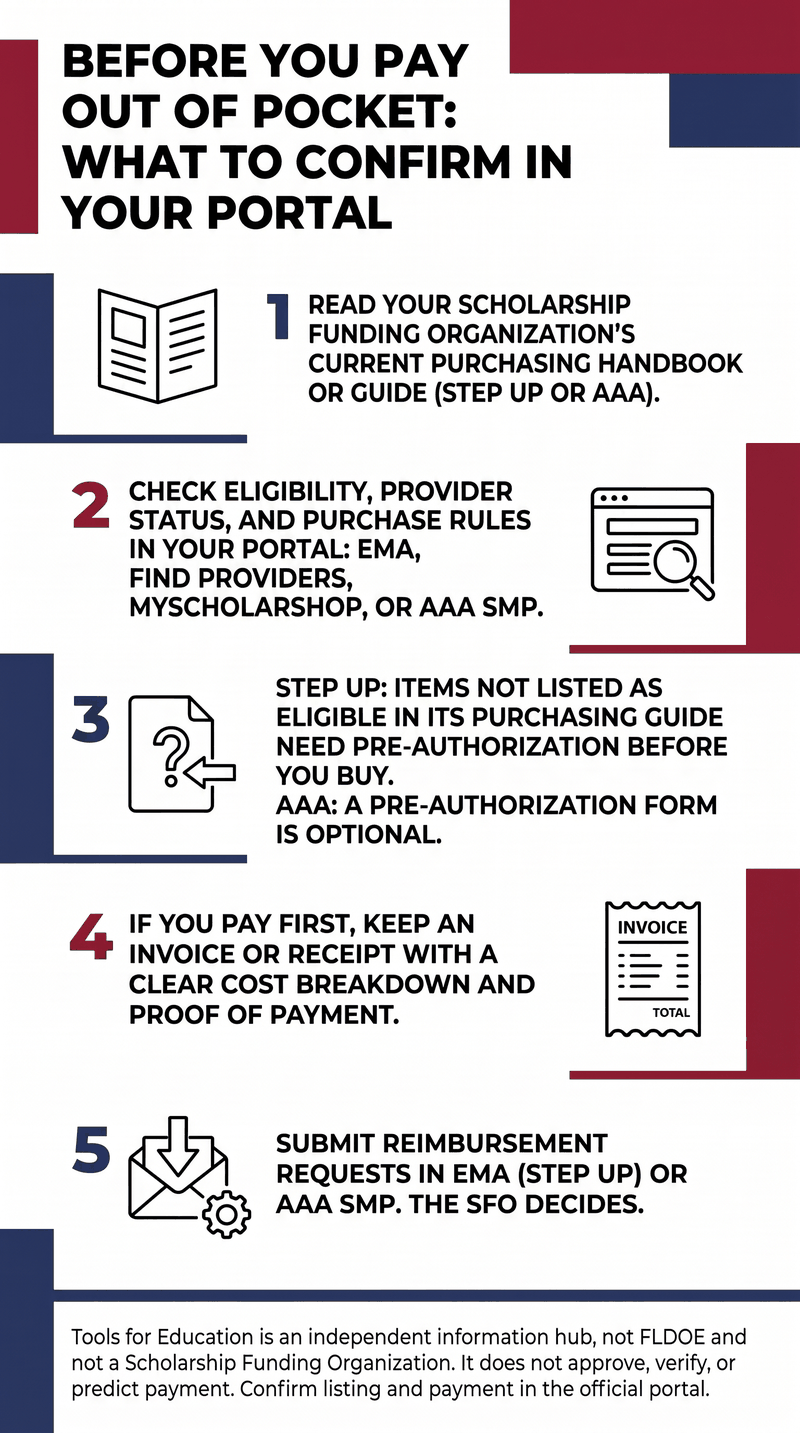
Two visuals for the same written guide: four places a purchase can happen, and what to confirm in your portal before you pay out of pocket.
How Florida ESA scholarship funds work
Direct state allocation, digital management
Scholarship funds are not deposited into a personal family checking account up front. They sit in a digital scholarship account administered by your SFO — either Step Up For Students or AAA Scholarship Foundation. Which portal applies depends on the account you were awarded.
Tools for Education does not list scholarship award amounts. The Florida Legislature sets funding annually; confirm the balance that applies to your student in your SFO account.
The core rule: portal truth governs purchases
Official rules for what can be bought, and what needs preauthorization or extra documentation, live in the SFO’s purchasing handbook or guide. Florida law requires each eligible SFO to publish that handbook (s. 1002.395(6)(t), F.S., 2026 edition). SFOs update the list of prohibited items and of items that need preauthorization or additional documentation.
Florida law also lets an SFO permit paying first and then requesting reimbursement, and lets an SFO require an online platform for direct purchases of products, as long as that platform does not limit a parent’s choice of curriculum (s. 1002.395(6)(u), F.S.). If a parent buys an identical product for a lower price than the SFO’s platform offers, the SFO must reimburse the cost of the product.
The authorized-use list itself is in s. 1002.395(6)(d)4., F.S. For FES-UA, authorized uses are in s. 1002.394(4), F.S. Those lists are the statutory baseline. What is allowed for your student at the time of purchase is what the live portal and current handbook show. Past listing does not guarantee current listing.
Tools for Education is an independent information hub. We are not the Florida Department of Education and not a Scholarship Funding Organization. Confirm eligibility, applications, and payments with FLDOE and your SFO. This hub does not approve, verify, or predict payment.
Step Up For Students purchasing rails
For families whose scholarships are administered by Step Up For Students, official materials name the Education Market Assistant (EMA) account and three purchasing rails. Tools for Education names those rails and the public gateway only. Confirm current steps, catalogs, and payment rules in the live portal.
Public login / gateway: Step Up Logins & EMA.
Rail 1: MyScholarShop
Step Up names MyScholarShop as an online store reached from the EMA account. Instructional materials and curriculum listed in the portal can be paid directly from the child’s scholarship account. Families are not required to use it; they may buy listed items from vendors and request reimbursement instead. Returns go through the vendor.
Public description: Step Up MyScholarShop. Confirm current catalog, shipping address on the student account, and purchase rules on that page and in EMA. This hub does not walk through in-portal screens, checkout, or how payment is drawn.
Rail 2: Find Providers (educational services)
Step Up names Find Providers as an in-account finder for educational services (for example, tutoring). It is reached only after EMA login.
Find Providers has no public standalone URL. Do not use a third-party directory as a substitute. The public description is the Step Up PEP Purchasing Guide. Confirm current provider listing and purchase rules in the authenticated EMA account via the Step Up login gateway.
Rail 3: Parent reimbursement
Step Up also names a reimbursement path for purchases that are not completed through MyScholarShop. You pay out of pocket, then submit a request in EMA with an invoice or receipt that has a clear cost breakdown and separate proof of payment.
Per Step Up’s 2026–27 PEP Family Handbook: review can take up to 60 days after all documentation is received (that clock restarts if the request is placed On Hold and you later supply the missing information). If a request is On Hold and you do not respond within 30 days, it is automatically denied. A denied request may be appealed once through EMA (the in-portal red APPEAL button). Appeals sent by email or other channels are not reviewed. Step Up reserves the right to close or deny any reimbursement request. A pre-authorization is not confirmation of a provider’s eligibility or of available funds.
This hub does not predict reimbursement. Confirm current reimbursement steps, required documentation, and review rules in the PEP Purchasing Guide, the PEP Family Handbook, and the live EMA portal.
AAA Scholarship Foundation purchasing rails
For families whose scholarships are administered by AAA Scholarship Foundation, official AAA materials name the Scholarship Management Platform (SMP). AAA states that Florida designed PEP as a reimbursement program: the parent pays for the educational good or service, then submits a reimbursement request through SMP.
On the student dashboard, once the account is awarded and funded, AAA names a button: “Click Here to Create New Reimbursement Request.” For FES-UA, AAA uses the same button for Direct Vendor Payment Requests. Messages and document uploads happen inside SMP.
AAA offers an optional PEP/FTC Pre-Authorization Form to request pre-authorization for an item or service that may be eligible if required by the selected curriculum or instructional material. This hub does not treat that form as mandatory. Confirm whether your item needs a form in the current AAA purchasing guidelines and the live SMP portal.
Public FAQ: AAA SMP FAQ. PEP overview: AAA Florida PEP page. This hub does not walk through in-portal invoices, uploads, or disbursement methods.
What purchasing guides name as categories
Official purchasing guides name authorized-use categories. Confirm current categories, documentation, and any item-level rules in your live portal before buying. This hub does not decide whether a specific item will be paid.
- Instructional materials and core curriculum: textbooks, literature, workbooks, science lab materials, and curriculum kits named in the current guide.
- Digital learning: online learning subscriptions, educational software, and interactive platforms named in the current guide.
- Educational services: contracted instruction and academic tutoring (educational services only).
- Testing and assessments: norm-referenced assessments and college entrance examinations named in the current guide.
Guides also name items that are not eligible — for example general household furniture, non-educational electronics, standard athletic clothing, personal travel, and entertainment activities. Read the current prohibited list in your SFO handbook. Item-level limits change; this hub does not reprint them.
For Step Up, items not listed as eligible in the purchasing guide need pre-authorization before purchase. Denied pre-authorization requests cannot be appealed.
A phrase that confuses parents
Handbooks use the spend-category phrase “home education instructional program.” That is an authorized-use category (tuition and fees for a sequentially progressive instructional program under s. 1002.395(6)(d)4.d., F.S.). It is not the same as registering a district Home Education program under s. 1002.41, F.S.
The Step Up PEP Family Handbook states that, for purposes of the scholarship program, a home education instructional program as an authorized use of funds is different from a home education program as defined in s. 1002.01(1) and s. 1002.41, F.S. A student funded under PEP cannot remain simultaneously enrolled in district Home Education. See our guides on District Home Education vs. PEP and moving between the two paths.
Before you pay out of pocket
- Read your SFO’s current purchasing handbook or guide (Step Up or AAA).
- Check eligibility, provider status, and purchase rules in your portal: EMA, Find Providers, MyScholarShop, or AAA SMP.
- Step Up: items not listed as eligible in its purchasing guide need pre-authorization before you buy. AAA: a pre-authorization form is optional; confirm in the current AAA guidelines.
- If you pay first, keep an invoice or receipt with a clear cost breakdown and proof of payment.
- Submit reimbursement requests in EMA (Step Up) or AAA SMP. The SFO decides. Nothing on this hub predicts payment.
Related guides on this hub
Spend rules sit next to application onboarding and, for FES-UA families using EMA reimbursement, a seasonal receipt-submission deadline. Read those guides here:
- How to apply for Florida scholarships — SFO portals, verification documents, and post-award onboarding (T02).
- FES-UA October 31 reimbursement deadline and EMA appeals — what that deadline covers, rollover of the account balance, and EMA’s single-appeal rule (S01).
FAQ
Do scholarship funds land in my personal bank account?
No. Funds sit in a digital scholarship account at your SFO. Approved reimbursements are paid to the parent after the SFO reviews a claim. Confirm disbursement methods in your portal.
Where do I log in for Step Up?
Use the public Step Up logins gateway, then your authenticated EMA account. MyScholarShop and Find Providers are reached from that account. Find Providers has no public standalone URL.
Does AAA work the same way as Step Up?
No. AAA names SMP and describes Florida PEP as a reimbursement program. An optional PEP/FTC pre-authorization form exists; this hub does not treat it as mandatory. Confirm current steps in the AAA SMP FAQ and live SMP portal.
Will this purchase be covered?
This hub does not predict payment. Confirm current eligibility, provider status, and purchase rules in EMA, Find Providers, MyScholarShop, or AAA SMP.
How much is the scholarship?
We do not list scholarship award amounts on this hub. The Legislature sets amounts annually. Confirm yours in your SFO account.
Where do I read the October 31 FES-UA receipt deadline?
On the related live guide: FES-UA October 31 reimbursement deadline and EMA appeals. This page does not restate that deadline.
Where to verify
Purchasing guidelines, documentation standards, and portal screens are updated by SFOs. Confirm current rules directly with official sources before you spend:
- Florida Statutes — Section 1002.395 (2026 edition; FTC / PEP, including (6)(d)4, (6)(t), (6)(u))
- Florida Statutes — Section 1002.394 (2026 edition; FES authorized uses in subsection (4))
- Step Up For Students — Logins & EMA Gateway
- Step Up — MyScholarShop
- Step Up — PEP Purchasing Guide (public description of Find Providers; no standalone Find Providers URL)
- Step Up — PEP Family Handbook
- AAA Scholarship Foundation — SMP FAQ
- AAA — Florida Personalized Education Program
Find Providers and MyScholarShop catalog checkout have no public standalone registration URL. Access is through the authenticated EMA account. Confirm listing and payment in the official portal.